AI Consulting
AI for Accountants: Tools, Workflows and Human Review
AI tools for accountants can reduce preparation work. Poor controls can also produce faster errors. Compare tools against one reviewable preparation task, checking the source evidence, exceptions and context available to the accountant. This guide covers tool choice and review; our accounting process automation guide explains how to map and automate a complete process.
This guide covers tools and guidance available in Australia as reviewed on 4 October 2026. Product access and features change, so confirm current terms, plan eligibility and release status before buying.
What should AI for accountants actually do?
Start with work that has defined inputs, a reviewable output and a clear owner. Depending on the product, that may include extracting fields from documents, proposing transaction categories, drafting routine correspondence, summarising a meeting or flagging an unusual item. These are possible uses, not a promise that every product performs each task well.
The workflow should preserve the source, state what the tool could not resolve and send the result to a named reviewer. Our guide to AI workflow automation explains how to record those hand-offs. For accounting-specific examples, see ways to automate accounting processes.
Materiality, professional scepticism, client circumstances and regulatory consequences still require professional judgement. Software may point to a variance. An accountant decides whether it matters and what should happen next.
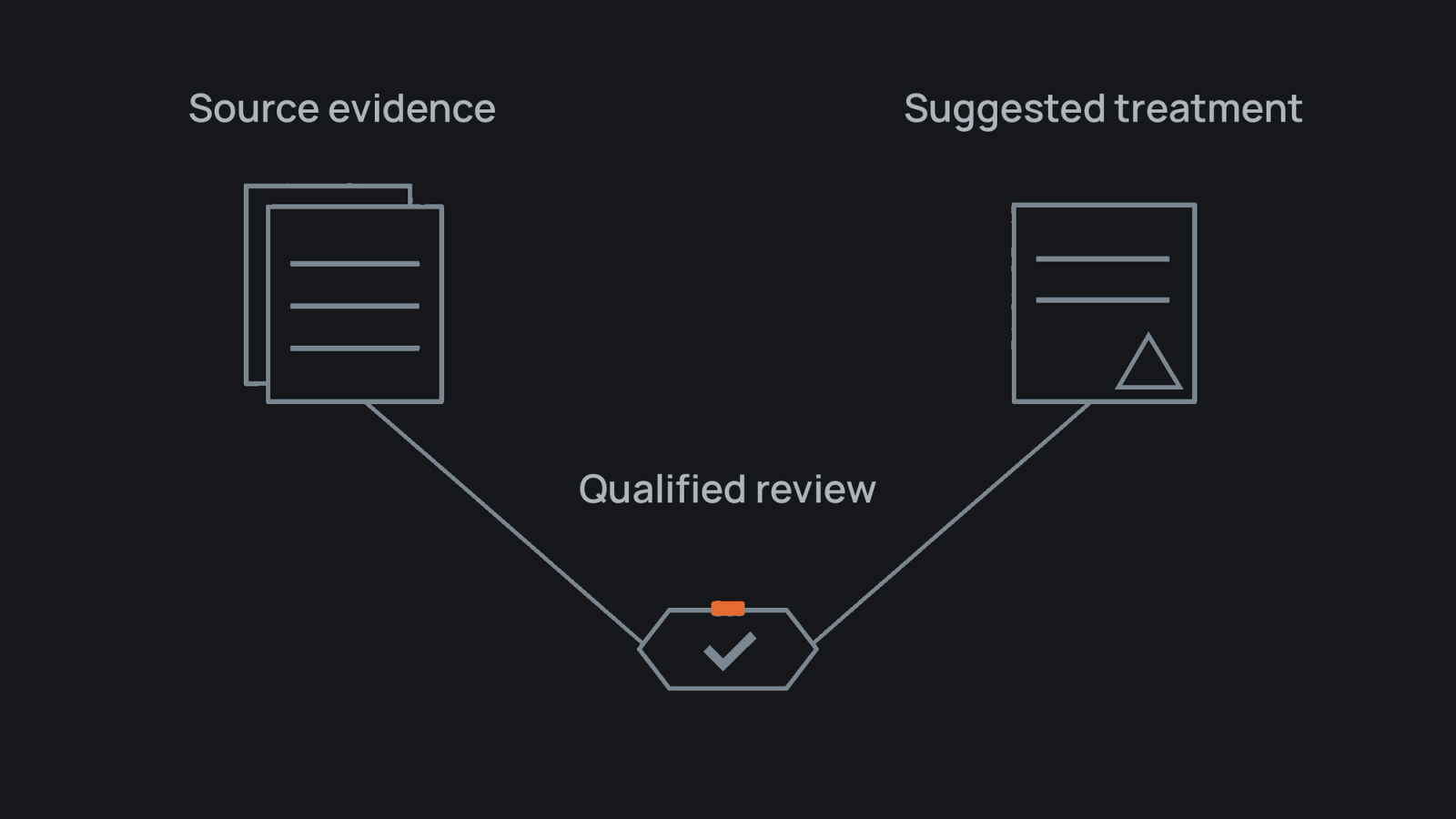
An AI-assisted accounting workflow should preserve the source and stop for accountable review.
Editorial note Xero and MYOB appear here as neutral Australian examples, not ranked recommendations. The capability statements are drawn from provider documentation, and Catalyst Systems did not run independent performance tests for this refresh. Confirm the current product, plan, file and role conditions before selection.
Which AI tool category fits the work?
Choose the product category that fits a defined job with the least unnecessary data movement and a review trail the practice can use. A BAS preparation feature, document extractor and meeting assistant are not substitutes.
Tool category comparison
- Accounting-platform AI: suitable work: Supported ledger and preparation tasks; evidence and review boundary: Preserve source transactions and history; review GST, exceptions, advice and lodgement.
- Document and workpaper AI: suitable work: Extracting or comparing supported files; evidence and review boundary: Link to the original and stop for missing pages, conflicting figures and conclusions.
- General assistant: suitable work: Drafting, summaries and research plans; evidence and review boundary: Use approved accounts and verify facts, citations and client meaning.
- Practice workflow AI: suitable work: Tasks, reminders, summaries and routing; evidence and review boundary: Record ownership, failures and exceptions before client communication.
Xero describes JAX features including bank reconciliation, document questions and financial insights. Xero Central labels JAX as beta and says available actions depend on plan, role and permissions, with activity recorded in History and notes.[1][2]
MYOB describes AI BAS as a preparation aid that can surface missing documents and possible GST issues. Its support material limits the current scope to specified labels, warns that information may be missing or incorrect, and leaves review, accuracy and lodgement with the user.[3][4]
Read AI tools in Australia for a wider category map. A provider page can describe availability, but it cannot prove that a product suits your files, privacy duties or review standard.
How should you compare AI tools for accountants?
Use one written workflow and a test set containing ordinary and awkward cases. Compare each product against the same six questions:
- What repeated burden should it reduce, and which decision stays with a person?
- Can a reviewer trace every output to source records or stated assumptions?
- Do missing information and low confidence stop the work or pass without warning?
- Does it fit existing accounting, document and workflow systems without creating a second record?
- Which information and actions are permitted, and who approves them?
- Who reviews changes to features, terms, prices and permissions?
The OAIC says product due diligence should cover intended use, testing, oversight, privacy, security and access to personal information.[5] The Australian Government also provides an AI screening tool, policy guide and register template.[6]
Record wrong outputs, reviewer effort and unresolved questions. A fluent answer is not enough. Accounting workflow software covers the surrounding process criteria.
Where should human review sit?
Put review before an AI output changes a client record, reaches a client, informs advice or supports a statutory submission. Name the reviewer by role and state what evidence they must inspect.
A practical review model is:
- sample checking for low-consequence internal drafts that contain no restricted client information
- source-based checking for extracted fields, suggested coding and client communication
- qualified professional review for material adjustments, tax positions, advice and lodgement
The source context should travel with the work. If an output says a client's margin changed, the reviewer should be able to see the period, data source, assumptions and relevant prior decision. Document control matters here. Accounting document management software covers the link between source files, access and review.
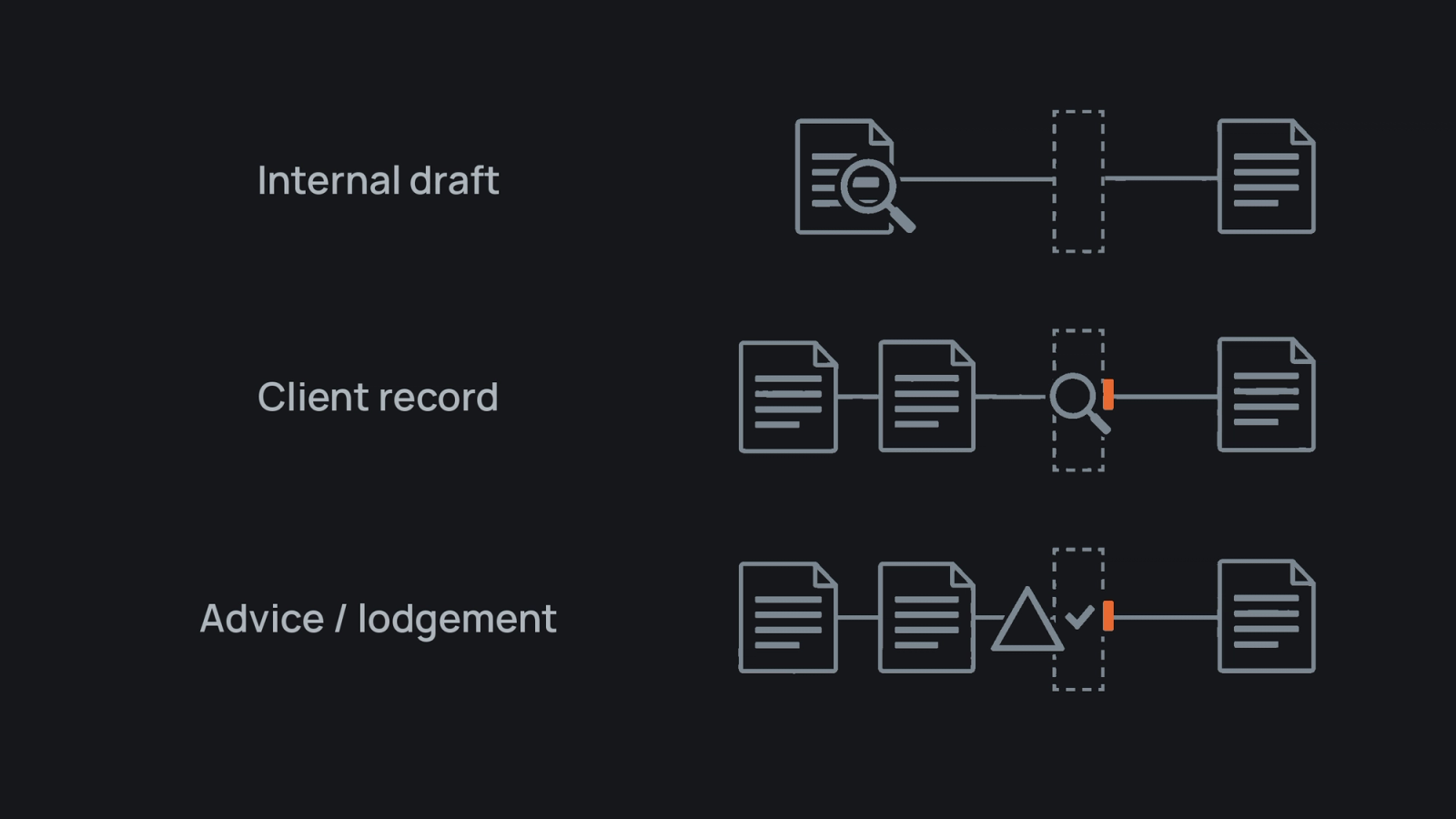
Review effort should increase as an output moves closer to a client record, advice or lodgement.
What information belongs outside an unapproved AI tool?
The OAIC recommends that organisations do not enter personal information, particularly sensitive information, into publicly available generative AI tools. It says privacy obligations can apply to personal information in both inputs and generated outputs.[5]
Before approving a product or use case, establish:
- the minimum information required for the job
- where inputs, outputs and logs are processed and stored
- who can access that information
- whether information is retained or used to improve the service
- which contract, deletion and audit controls apply
- what evidence remains if an output is challenged
Vendor answers do not prove that a use is safe or lawful. Assess them against contracts, privacy obligations, professional duties and the practice's risk settings.
How can a practice start without weakening judgement?
Choose one repeated preparation task, map its current hand-offs and design the review before switching on automation. Business process mapping helps expose missing inputs, duplicate entry and unclear ownership.
A controlled pilot should define its inputs, output and exclusions; test normal and awkward cases; assign an owner and exception route; compare wrong outputs and review effort with the current process; and record the approved use and next review date. The AI readiness assessment guide explains what to inspect before expanding the pilot.
Onboarding is often a useful place to inspect the quality of inputs without handing decisions to a tool. The bookkeeping onboarding checklist shows the documents, access and responsibilities that need to be clear first.
Protect the judgement clients buy
A firm's client history, professional scepticism and pattern recognition shape the advice clients receive. AI can help prepare evidence and bring relevant context to the reviewer. The consequential call still belongs to the qualified person.
to identify the gaps to address first.
Sources
- Xero Australia, AI accounting software for Australian business, accessed 4 October 2026.
- Xero Central, About JAX (BETA), accessed 4 October 2026.
- MYOB Australia, AI BAS software, accessed 4 October 2026.
- MYOB Support, Get BAS-ready faster with AI BAS, accessed 4 October 2026.
- Office of the Australian Information Commissioner, Guidance on privacy and the use of commercially available AI products, updated 17 January 2025.
- Australian Government Department of Industry, Science and Resources, Guidance for AI Adoption, published 21 October 2025.
Before automating this workflow, check whether the process, information, ownership and review controls are ready. The assessment helps identify the first constraint to fix.
Take the AI readiness assessmentFrequently asked
- Will AI replace accountants?
- AI can change preparation work, but clients still need a person to interpret evidence, understand their circumstances and take responsibility for advice.
- Is built-in accounting AI better than a general assistant?
- Built-in AI may use authorised product records, while a general assistant may be more flexible for drafting. Compare them by job, permitted data, evidence and review controls.
- Can AI prepare a BAS?
- Some products support parts of BAS preparation for eligible files, but scope varies. The responsible user or adviser must review the result and lodge through the usual channel.
- How often should an accounting AI tool be reviewed?
- Review it on a set schedule and whenever the use case, data, integration, terms, permissions or material features change.