Operating Intelligence
Decision Log Template: Stop Having the Same Conversation Twice
A decision log template needs six fields: the decision, the reason, the evidence, the owner, the status and the review trigger. Recording what was decided is not enough on its own, because the next person also needs to know why, what the choice rested on and what would change it.
Without those parts, a decision log becomes a list of conclusions nobody can apply. A team member reads "we no longer take urgent jobs on Fridays", cannot tell whether that still holds for a long-standing client with a genuine emergency, and asks you. The conversation you had months ago happens again, and you rebuild the reasoning from memory.
A decision log records what was decided and why. Who has the authority to approve a decision is a separate question, and the log does not settle it.
What belongs in a decision log?
A decision log holds the choices that change how the team works and that someone is likely to question later. Meeting notes record what was discussed, and task updates record progress. Neither tells a new person which choice is settled and still in force.
A simple test decides it: could a capable colleague, working alone, reasonably make a different choice in the same situation? If they could, the choice belongs in the log, because without it they will either guess or ask.
Belongs in the log:
- Rules about scope or service: what you will and will not do for clients, and the exceptions you have agreed.
- Exceptions to a normal process: when it is acceptable to skip or change a step, and under what conditions.
- Choices between tools, suppliers or methods: what was picked, and what was ruled out.
- Decisions not to do something: a service you stopped offering, or an idea you tested and dropped.
Stays out of the log:
- Discussion that settled nothing: that belongs in meeting notes, if anywhere.
- Task status and progress: that belongs in the job or project tool.
- Routine choices an existing procedure already covers: link to the procedure instead.
Not every decision deserves an entry. In his 2016 letter to shareholders, Jeff Bezos wrote that "many decisions are reversible, two-way doors" and that "those decisions can use a light-weight process." The same logic applies to writing them down: a choice that is cheap to undo and unlikely to be questioned does not need a record.
What should a decision log template include?
Each entry answers six questions: what did we decide, why, based on what, who keeps it current, does it still apply, and what would make us look at it again. Software teams have kept records like this for more than a decade. Michael Nygard's 2011 format for architecture decision records uses a title, context, decision, status and consequences, and the UK Government's 2025 decision record framework adds the stakeholders consulted and links to supporting documents.
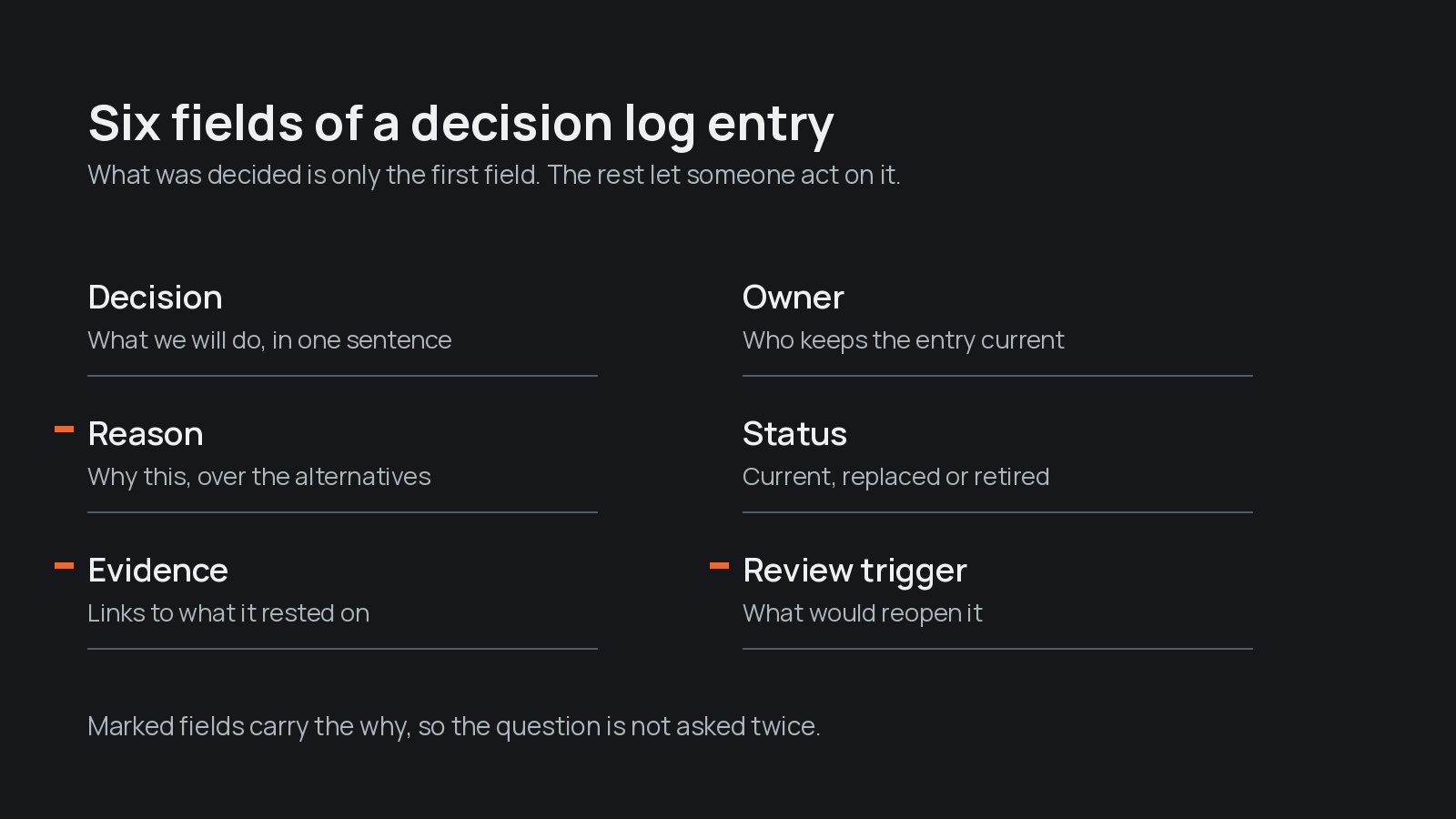
The six fields, and what each one prevents:
- Decision: one sentence in plain, active language. Without it, people argue about what was actually agreed.
- Reason: why this option was chosen over the others considered. It lets the next person judge whether their case is the one the decision was made for.
- Evidence: links to the email, figures, client feedback or document the decision rested on. With links, the reason can be checked rather than taken on trust.
- Owner: the person who keeps the entry current and answers questions about it. This is the record's keeper, not necessarily the person who approved the decision.
- Status: current, under review, replaced or retired. A reader can see at a glance whether the entry still applies.
- Review trigger: the event or condition that means the decision should be looked at again. A clear trigger keeps a decision from being reopened every time someone feels uneasy, and from outliving the reason behind it.
The decision log template
Copy these fields into whatever your team already uses: a shared document, a spreadsheet with one row per decision, or a page in your project tool.
- Decision: [What we will do, or stop doing, in one sentence.]
- Date decided: [The date it was agreed.]
- Reason: [Why we chose this, and what we considered instead.]
- Evidence: [Links to the email, numbers, document or feedback this was based on.]
- Owner: [The person who keeps this entry current.]
- Status: [Current, under review, replaced by (link to the newer entry), or retired.]
- Review trigger: [What would make us look at this again.]
A filled-in example
Here is an illustrative entry for a small service business. It is a made-up example to show the level of detail, not a recommendation for your business.
- Decision: Client requests that arrive by text message are entered in the job system before anyone starts work on them.
- Date decided: The date of the team meeting where it was agreed.
- Reason: Requests sent by text to one person's phone were missed when that person was away. Entering them first means anyone can see and pick up the work.
- Evidence: Link to the missed requests reviewed at the meeting, and to the job system's intake form.
- Owner: The office manager.
- Status: Current. Replaces the earlier practice of whoever received the message handling it directly.
- Review trigger: The job system adds a way to forward text messages automatically, or most clients move to a different way of contacting us.
How do you record a decision without creating more admin?
Keep the record beside the work, write it at the moment the decision is made, and link to the evidence instead of copying it. A decision log that lives in a separate tool nobody opens becomes one more place to check, which is the problem it was meant to solve.
Three habits keep it light:
- Put the log where the team already looks. A decision about a client goes in that client's file. A decision about how the team works goes in the same place as your procedures.
- Write the entry before the meeting ends. Ask "who is writing this one down?" while everyone is still in the room and the reason is fresh. Reconstructing the reasoning a week later takes longer and loses detail.
- Link the evidence where it lives. The email thread, the figures and the client feedback already exist somewhere. A link keeps the log short and keeps one version of each source.
Tip
In practice, this means: if writing an entry takes more than a few minutes, the decision either needs more thought or the entry is trying to hold more than it should.
The same principle runs through good process documentation: record the judgement close to the work it governs, so the people doing the work find it when they need it.
How should the team handle changed decisions?
When a decision changes, add a new entry and mark the old one as replaced, with a link from each to the other. Do not overwrite the original. Nygard's format handles this the same way: an earlier record is marked "superseded" with a reference to its replacement.
Keeping the old entry does three jobs:
- It shows the reasoning moved, not just the rule. A reader can see what was true then and what changed.
- It protects people working from the old version. Someone who remembers the earlier rule finds a clear pointer to the current one.
- It stops the team reopening a closed question. When someone suggests going back to the old way, the record shows why it was dropped.
Nygard named the two failures this prevents. Without the reason, people either accept an old decision blindly after its context has changed, or reverse it blindly without understanding why it was made. The new entry should say what changed: a new fact, a review trigger that fired, or a reason that no longer holds.
Can someone use the record without asking you?
An entry works if a colleague who was not part of the decision can read it, apply it to a real case and know when to bring it back to you. You can check this in a few minutes.
Give one entry to a team member who was not in the room and ask them three questions:
- What would you do in the normal case this covers?
- What would you do in an unusual case that sits close to the edge of it?
- What would make you raise it again rather than follow it?
If they come back to you with questions, the entry is usually missing its reason, its evidence or its review trigger. Fix the entry rather than answering the question, or the same question will return.
This matters most when someone leaves or is away. Writing about its own decision record framework, the UK Government Digital Service put it plainly: "When people move on, we can lose context of why decisions were made in certain ways." In a small business, that context often sits with one person, which is the same pattern behind key person risk and the knowledge that walks out with leavers.
The same gap shows up in what we call the two-weeks test: what breaks if you take two weeks off? A decision that lives only in your head is one of the first things to break, because nobody else can tell whether it still applies.
A decision log lets other people apply the judgement you have already made, and it still brings you the cases that need a fresh one.
Start with the decisions your team keeps reopening
The best first entries are the questions you are asked more than once. Each repeat question usually points to a decision that was made but never written down with its reason.
For the next week or two, keep a list of every question that lands on you that you have answered before. Then pick the ones that come up most often and write each as a decision log entry using the template above. Share the entries with the people who asked, and ask whether they could now act without you.
A written log is the right place to start, and it does not have to stay manual. At Catalyst Systems we build systems that hold what the best people in a business carry. Clearly, our product, captures what happens in the conversations where decisions are made and connects it to what the business already knows, so the reason is still there when someone needs it.
Some of the repeat questions will turn out to have no decision behind them at all, only a habit. Those are worth deciding properly, once, and writing down.
Frequently asked
- What is the difference between a decision log and meeting minutes?
- Meeting minutes record what was discussed at one meeting, in the order it was discussed. A decision log records only settled choices, with the reason, evidence and current status of each, so it stays useful long after the meeting. Minutes can point to the log, and a log entry can link back to the minutes as evidence.
- Who should keep a decision log in a small business?
- Each entry needs one owner who keeps it current and answers questions about it, usually the person closest to the work it affects. That person keeps the record; they are not necessarily the person who approved the decision. Who has authority to make or approve decisions is a separate question that the log does not answer.
- Where should a small team keep its decision log?
- Keep it wherever the team already works, such as a shared document, a spreadsheet with one row per decision, or a page in the project or job tool. Decisions about a particular client are easiest to find in that client's file. A separate tool that nobody opens tends to go stale.
- How often should a decision log be reviewed?
- Review an entry when its review trigger happens, not on a fixed timetable. It also helps to read through the current entries when someone joins the team, because a new person will quickly show which entries are unclear or out of date.